What Is AI Automation and How It Works
A support inbox that tags tickets, drafts replies, routes urgent issues, and learns which cases need a human is more than a faster workflow. It is a practical answer to the question, what is ai automation, because it combines decision-making with execution. Instead of only following fixed rules, the system uses AI to interpret inputs, choose an action, and keep work moving.
That distinction matters if you are building products, running operations, or trying to turn AI from a demo into something useful. A lot of teams use the term loosely. They call any workflow with an AI model in it “automation,” even when a human still has to babysit every step. Real AI automation reduces manual effort while handling variability that standard software alone struggles with.
What is AI automation?
AI automation is the use of artificial intelligence to automate tasks, decisions, or workflows that normally require some level of human judgment. Traditional automation is rule-based. It works best when every condition is known in advance. AI automation adds systems that can analyze language, recognize patterns, classify inputs, generate outputs, and adapt to messy real-world data.
A simple rule-based workflow might say, “If a form field contains X, send it to team Y.” An AI automation workflow can read an entire customer message, detect the intent, estimate urgency, pull relevant context from a knowledge base, write a response draft, and escalate edge cases. The workflow still follows a structure, but AI handles the parts that are too variable for rigid rules.
That is why the better question is not whether AI automation replaces automation. It does not. It extends it. The most effective systems combine deterministic logic, AI models, and human review where needed.
How AI automation actually works
At a high level, AI automation has three layers. The first layer is input. That could be text, voice, images, documents, transaction data, or events from other tools. The second layer is intelligence. This is where models classify, summarize, extract data, predict outcomes, or generate content. The third layer is action. The system sends emails, updates records, triggers workflows, assigns tasks, answers customers, or hands work to a human.
For builders, the key idea is that AI is rarely the whole system. The model is one component in a larger architecture. You still need prompts, business logic, fallback behavior, validation, memory, integrations, and monitoring. If you skip that structure, you do not have automation. You have an impressive demo that breaks under normal use.
This is also where many teams get stuck. They can generate text in a chat window, but they cannot translate that capability into a dependable process. Moving from experiment to production means defining when the AI acts, what tools it can access, what success looks like, and when a human should step in.
AI automation vs traditional automation
Traditional automation is excellent for stable, repetitive processes. Think scheduled reports, invoice routing based on exact fields, or status updates triggered by a clear event. It is predictable, fast, and often cheaper to maintain when the workflow does not change much.
AI automation becomes valuable when the input is unstructured or the decision requires interpretation. Customer support, lead qualification, document processing, research synthesis, voice interactions, and internal knowledge retrieval are strong examples. These jobs often involve language, ambiguity, exceptions, and context.
The trade-off is that AI automation is less deterministic. Models can be wrong. They can misclassify a request, invent details, or make inconsistent choices if the system is poorly designed. That does not make AI automation unreliable by default. It means you need better system design. Guardrails, confidence thresholds, prompt testing, human approval paths, and strong evaluation matter more than they do in standard automation.
Where AI automation creates real value
The strongest use cases usually share one trait: they remove repeated cognitive work, not just clicks. That is the difference between marginal convenience and actual leverage.
In customer operations, AI automation can categorize incoming requests, draft responses, surface policy answers, and route complex cases. In sales, it can enrich leads, score intent signals, personalize outreach, and update CRM records. In finance, it can extract invoice data, detect anomalies, and match transactions. In product teams, it can summarize feedback, cluster feature requests, and turn transcripts into actionable insights.
For founders and operators, there is another layer of value. AI automation can compress the gap between idea and execution. Instead of hiring a large team to handle repetitive research, content operations, support triage, or internal documentation, you can build systems that carry a meaningful share of the workload. That does not eliminate people. It gives people better focus.
What AI automation is not
It is not magic, and it is not one tool.
AI automation is not the same as asking a chatbot a question. It is not simply “using AI at work.” It is not a plug-and-play solution that understands your business on day one. And it is not always the right choice. If a process is straightforward and fully rules-based, adding AI can create unnecessary complexity and cost.
It is also not a set-it-and-forget-it system. Inputs change. Customer behavior changes. Models change. Your business rules change. Good AI automation needs maintenance, evaluation, and iteration. Teams that treat it like static software usually end up disappointed.
What is AI automation in a product-building context?
If you are building AI products, the answer to what is ai automation gets more specific. It is the design of systems that do useful work with limited human intervention while still meeting quality, safety, and business goals.
That could mean an AI agent that qualifies inbound leads and books meetings. It could mean a workflow that turns voice notes into project briefs, task lists, and CRM updates. It could mean a document pipeline that reads contracts, extracts obligations, and flags legal review points. In each case, the value is not just generation. The value is coordinated execution.
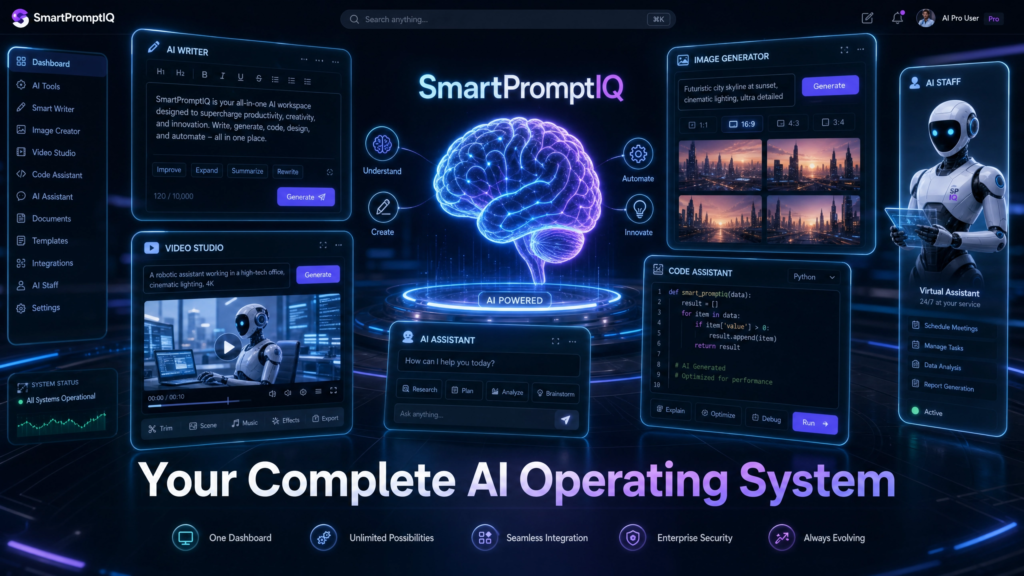
This is why serious builders think in systems, not prompts alone. Prompts matter, but they are only one layer. You need workflow logic, tool access, memory strategy, failure handling, and deployment planning. Education helps, but execution is what turns understanding into output. That is where platforms like SmartPromptIQ fit naturally for users who want both the skill development and the blueprint to ship.
The core components of a reliable AI automation system
Most production-ready AI automation systems include a trigger, a model task, a decision layer, and an action layer. The trigger starts the process, such as a new form submission or incoming email. The model task performs interpretation or generation. The decision layer checks confidence, applies business rules, and determines next steps. The action layer writes data, sends messages, launches workflows, or escalates to a person.
The missing piece in many first attempts is validation. If the AI extracts key details from a document, how do you verify accuracy? If it drafts a response, what prevents brand or policy mistakes? If it uses external tools, what permissions should it have? Reliability comes from system boundaries, not optimism.
Common mistakes teams make
One mistake is automating a bad process. If the workflow is messy, unclear, or full of exceptions nobody has mapped, AI will not fix that. It may just make the confusion happen faster.
Another mistake is over-automating too early. Not every task needs full autonomy. Sometimes the best first version is human-in-the-loop, where AI prepares work and a person approves it. That setup often delivers value faster and gives you better training data for the next iteration.
Teams also underestimate change management. Even a strong system can fail if users do not trust it, know when to override it, or understand how decisions are made. Adoption matters as much as model quality.
How to know if AI automation is a good fit
A task is usually a strong candidate if it happens often, follows a general pattern, involves unstructured inputs, and consumes time that skilled people should spend elsewhere. If mistakes are low-risk or easy to review, that is an even better place to start.
On the other hand, if the task is rare, highly sensitive, or requires deep contextual judgment with little room for error, a lighter AI assist workflow may be smarter than full automation. There is no prize for maximum autonomy. The goal is useful, dependable output.
The best starting point is usually narrow. Pick one workflow with clear inputs, a measurable outcome, and obvious business value. Build it. Evaluate it. Then expand.
AI automation is not about replacing human intelligence with a black box. It is about designing systems that let human intelligence operate at a higher level. When you approach it that way, you stop asking whether AI is impressive and start asking whether it can carry real work. That is the shift that turns curiosity into momentum.